The Internet Made Simple

What Is the Internet (In Simple Words)?
The internet is a huge network of connected computers all over the world. These computers talk to each other and share information. When you open YouTube, send a WhatsApp message, or check exam results online, you are using this network.
Think of the internet like India’s road system:
Roads connect cities and villages
Vehicles carry people and goods
Traffic rules help everything move smoothly
In the same way:
Cables and wireless signals are the roads
Data is the vehicle
Internet rules and systems keep data moving correctly
How Data Travels on the Internet
When you open a website, data does not travel as one big piece. It breaks into small packets(a topic in itself), just like parcels sent by courier. Each packet finds its way to the destination and then comes back with the reply.
Step-by-step journey:
You type a website name in your browser like youtube or netflix
Your device asks for the website’s address
Data travels through many networks all happening in milliseconds
The server sends the website back to you
All this happens in seconds.
Key Parts That Make the Internet Work
1. Internet Service Provider (ISP)
Your ISP is the company that gives you internet access, like Airtel, Jio, or a local ISP. It connects your phone or laptop to the bigger internet world.
ISP is like the local bus stand that connects your town to highways.
2. Routers
Routers decide which path data should take, just like traffic police or Google Maps choosing the fastest route.
Routers are road junctions guiding vehicles.
3. DNS (Domain Name System)
DNS is like the phonebook or contact list of the internet. Humans remember names like google.com or our friend’s name like Kashish, but computers understand numbers (IP addresses are unique phone numbers for websites). DNS converts names into numbers.
Saving a contact name instead of remembering a phone number.
Diagram Idea: How Data Moves
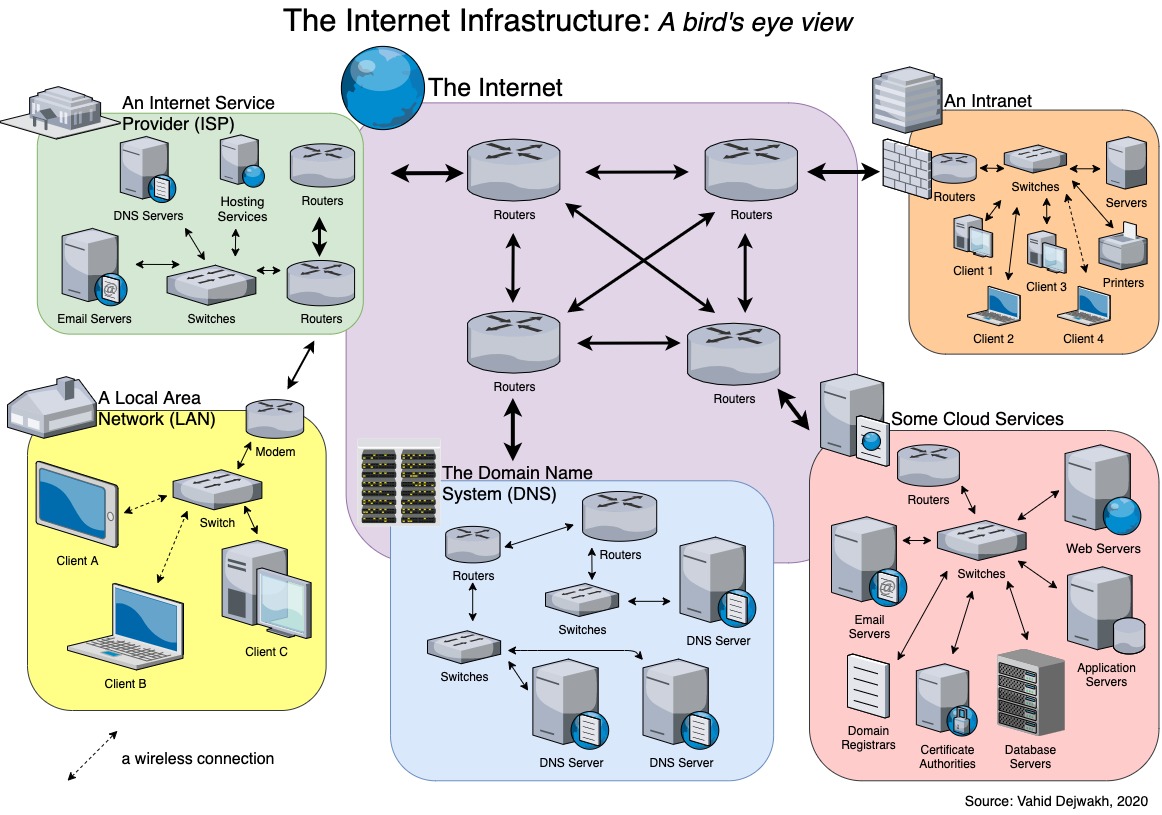
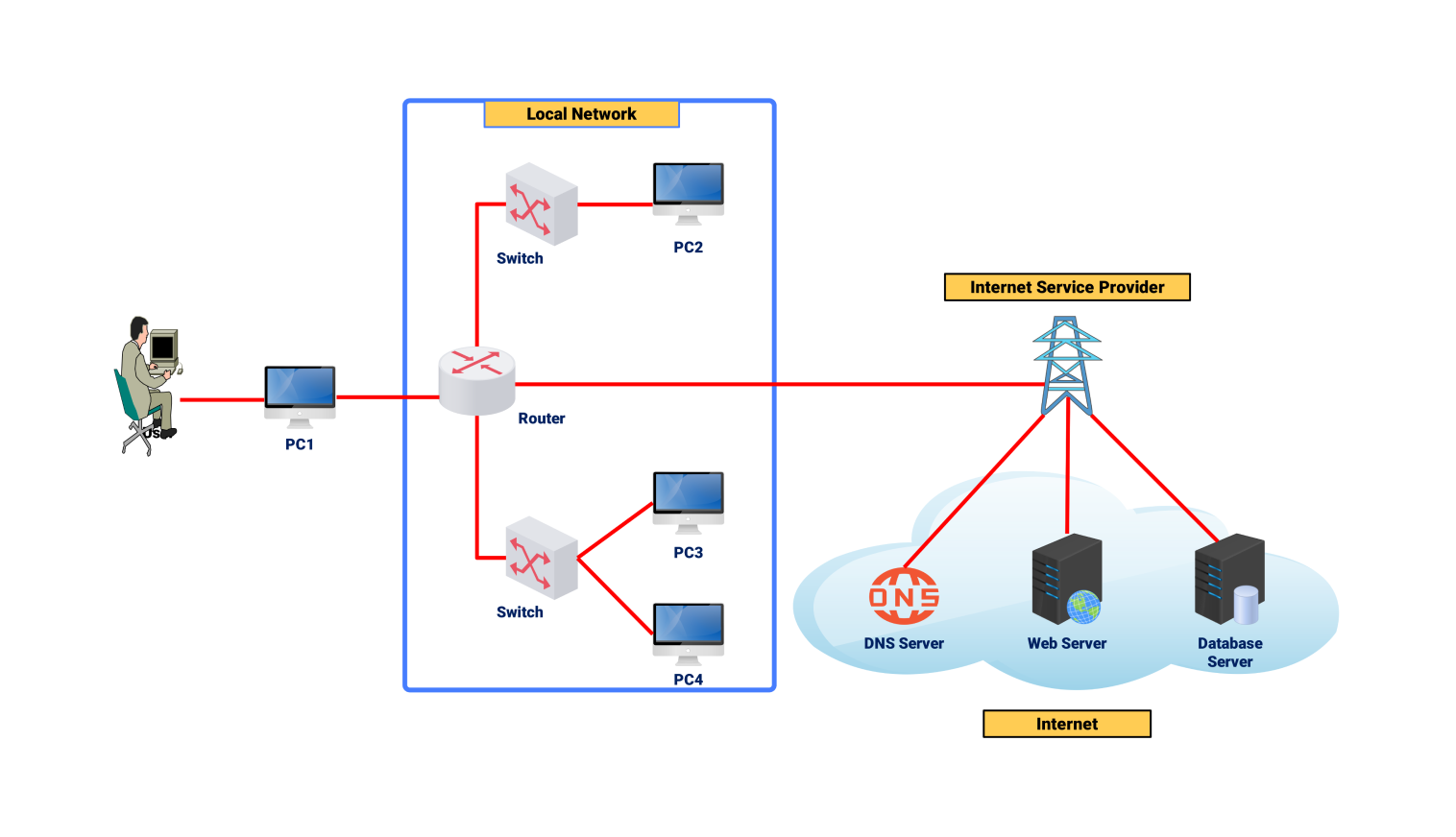
Flow:
User Device → ISP → Routers → Server → Back to Device
Key steps:
DNS lookup
Data transfer
Server response
Illustration Idea: A Web Request
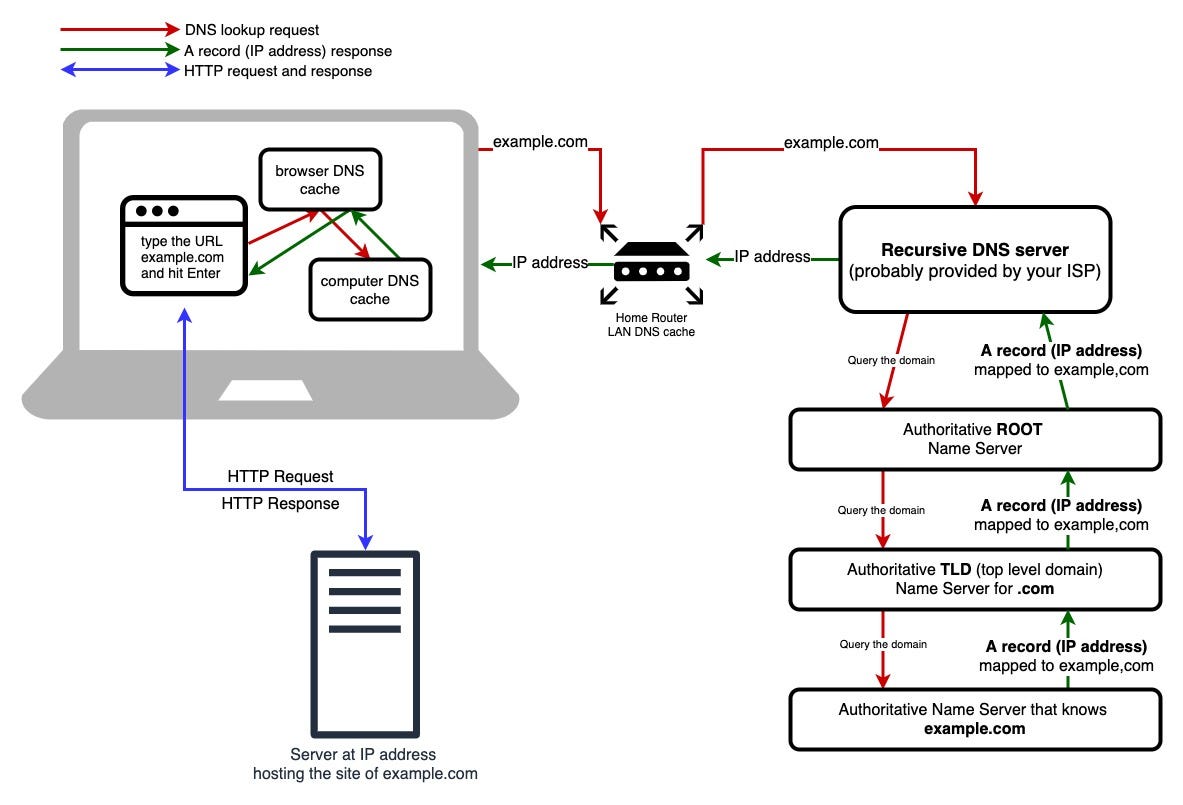
This shows how your browser request travels, reaches the server, and comes back with a webpage.
Why the Internet Matters
The internet has changed daily life :
Online education and exams
Digital payments like UPI
Government services (Aadhaar, PAN, portals)
Small businesses selling on Instagram and WhatsApp
Even villages are getting connected through affordable data plans.
Pros and Cons of the Internet
Pros
Fast access to information
Easy communication
Online learning and jobs
Saves time and travel
Cons
Fake news and misinformation spreads easily
Privacy and data security risks, getting a add recommendation after searching for a item.
Internet addiction which can be seen in too much screen time
Unequal access in some rural areas, infrastructure challenges
Cost and Value for Money (Indian Context)
India has some of the cheapest internet data in the world. Monthly plans are affordable for students and families.
Value for money:
Very high, because one connection supports education, payments, work, and entertainment.
Final Thoughts
The internet may look complex, but at the end of the day, it is just computers talking to each other using well-planned routes. Understanding how it works helps us use it better and more responsibly.
Next time a webpage loads in seconds, remember the long journey your data just completed—faster than any vehicle on Indian roads.


