DNS Records and Hierarchy: What Every Web User Should Know

Have you ever typed a website name like google.com and wondered 🤔 how your browser knows where to go? I used to think the internet just “understands” website names. But after reading about it for a day or two, I realised DNS is quietly doing one of the most important jobs on the internet.
In this article, we’ll understand what DNS is, why it’s important, common DNS record types, and how the DNS hierarchy works, using simple words and everyday examples.
What Is DNS and Why Is It Important?
DNS (Domain Name System) is like the phonebook of the internet 📒.
Simple Analogy ☎️
You save a contact name like Mom, Masi, Electrician
Your phone actually uses a phone number behind the scenes
Similarly:
You type
example.comDNS converts it into an IP address that computers understand
Without DNS:
We would need to remember numbers like
142.250.190.14😵Trust me the internet will be very hard to use
👉 Quick question:
Would you prefer remembering names or long numbers every time you open a website?
Why DNS Matters So Much 🌍
DNS is important because it:
Makes the internet human-friendly
Allows websites to change servers without changing names
Improves speed using caching(basically keeping a value or data once called for future use , fetched once used multiple times)
Works silently every time you browse
Indian context 🇮🇳:
Whether you open a video streaming platform, government website, a college portal, or an e-commerce app, DNS works in the background without you noticing.
How DNS Works (High-Level View)

What Happens When You Open a Website?
You type a domain name
DNS looks for its IP address
Browser connects to the correct server
Website loads
All this usually happens in milliseconds ⚡.
Types of DNS Records You Should Know
DNS records store important information about a domain. Let’s look at the most common ones beginners should know.
1. A Record
Maps a domain name to an IPv4 address
Example:
example.com→ 93.184.216.34
2. AAAA Record
- Same as A record, but for IPv6 addresses
3. CNAME Record
Points one domain to another domain
Often used for subdomains
4. MX Record
Handles email delivery 📧
Tells mail servers where to send emails
5. TXT Record
Stores text information
Commonly used for verification and security
👉 Think about this:
Which record do you think is most important for emails to work properly?
DNS Hierarchy Explained: From Root to Authoritative Servers
DNS follows a hierarchical structure, not a single server. This makes it fast and reliable.
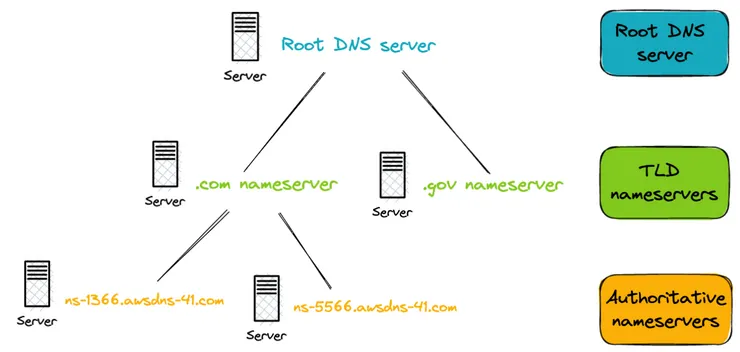

1. Root DNS Servers
Top of the DNS system
Knows where TLD servers are
Example: “Ask the .com server”
2. TLD (Top-Level Domain) Servers
Handle extensions like
.com,.in,.orgDirect queries to the correct authoritative server
3. Authoritative DNS Servers
Store the actual DNS records
Give the final IP address
👉 Simple way to remember:
Root → TLD → Authoritative → Answer ✔️
Why DNS Is Fast (Even Though It Looks Complex)
DNS uses caching 🧠:
Your browser remembers recent lookups
Your ISP stores common results
Reduces repeated work
That’s why websites you visit often load faster.
Pros and Cons of DNS
Pros ✅
Easy-to-use internet
Fast website access
Scalable and reliable
Cons ❌
Can be targeted by attacks
Misconfiguration causes website downtime
Final Thoughts 💡
DNS is invisible, but without it, the internet would be nearly impossible to use. Once you understand DNS records and hierarchy, many “internet mysteries” start to make sense.
If you’re learning networking or web development, DNS is one topic you should definitely not skip 😊


